Monitoring
- Monitoring server
- Monitoring dashboard
Kubernetes
K3S Deployment in Homelab
Complete Guide
Networking
Deprecated (Migrated to Docker)
Tailscale
- Create a Ubuntu LXC
- Run the helper script in a PVE node
- Enable IP forwarding by following this
- Configure ethtool
tailscale up --advertise-routes=<subnet_ip>
Pi-hole
- Install Pi-hole with this script
- Add Tailscale to LXC with this script
- Enable IP forwarding by following this
- Configure ethtool
tailscale up --advertise-routes=192.168.1.0/24 --accept-dns=false --advertise-exit-node --accept-routes- pi-hole settings > dns > permit all origins, use 127.0.0.1#5335 as upstream dns
Docker
Overview
- Volumes
- Networking
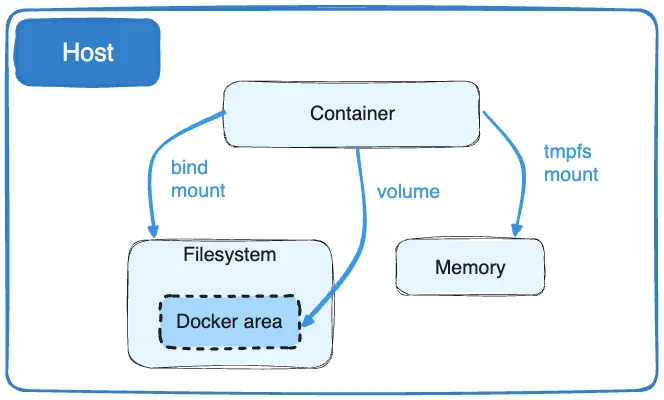
Generate .env.example
sed 's/=.*/=/' .env > .env.exampleVM Installation
- iGPU Passthrough
- Usual Debian Installation
sudo apt update && sudo apt upgradevi /etc/ssh/sshd_configPasswordAuthentication yesPermitRootLogin yesservice ssh restart- In local machine run
ssh-copy-id root@<addr> - Set the previous options back to default
- Install docker, gh
- Clone repo
- Copy .env
apt install nfs-common cifs-utils
- Delay systemd docker daemon start by waiting to ping NAS
ctop
alias ctop="docker run --rm -ti --name=ctop --volume /var/run/docker.sock:/var/run/docker.sock:ro quay.io/vektorlab/ctop:latest"Ansible
Tailscale
Traefik
https://technotim.live/posts/traefik-3-docker-certificates/
https://www.youtube.com/watch?v=hEoV_FjtWhE
https://www.youtube.com/watch?v=C6IL8tjwC5E
traefik.ymlfor static configconfig.ymlfor defining routers and services- Setup ACME by labels of the traefik container
Pi-hole
- A, CNAME records
Immich
- SMB network volume
- Storage template
{{y}}/{{y}}-{{MM}}-{{dd}}/{{y}}-{{MM}}-{{dd}}_{{HH}}.{{mm}}.{{ss}}_{{filename}}
Jellyfin
- iGPU passthrough
- NFS network volume
qBittorrent
- NFS network volume